
To upload a file to a files collection.
URL
(POST) /api/media/filescollection/{key}/items/file?filename={filename}
PARAMETERS
The URL parameters are:
|
key |
The unique files collection ID |
string, Mandatory |
|
filename |
The filename including the file extension such as “myfile.docx” or “webpage.html”. If the collection already contains a file with that name, the existing file will be replaced. |
string, Mandatory |
The BODY must contain the file to upload:
-
Submit as a multipart upload
-
The content type must be "multipart/form-data"
-
See at the bottom of this page for more information.
RESULTS
The result is a JSON object with the properties of the uploaded file.
See File object for properties.
Example:
    "name": "marketing.docx",
    "ext": ".docx",
    "translate": false,
    "parserId": null,
    "domain": null,
    "parsers": null,
    "pageCount": null,
    "sizeKB": 1,
    "comments": null,
    "ok": true,
    "error": null,
    "errorLink": null
}
USING POSTMAN OR CURL
Using Postman, you need to attach the file as follows:
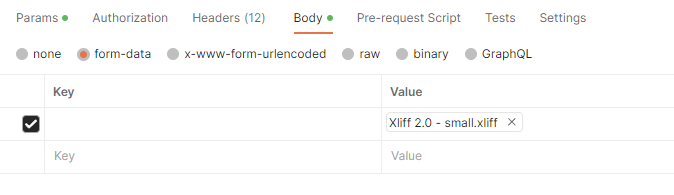
Using curl, you would proceed as follows:
curl --location 'https://myaccount.wordbee-translator.com/api/media/filescollection/5457027a-5c62-479a-aee1-f7dbbe3bfc28/items/file?filename=myfile.xliff' \
--header 'Content-Type: application/json' \
--header 'X-Auth-Token: 22674fc5-a169-468f-a92b-964b251bc7de' \
--header 'X-Auth-AccountId: myaccount' \
--form '=@"/C:/Users/whatever/Desktop/myfile.xliff"'