
The following QA Rules may be customized in Wordbee Translator to help you monitor the quality of your translations. During translation, the QA Checks will automatically flag the errors in the target segments. It is possible to create QA profiles with different sets of rules or alternative configurations.
List of rules and options
|
QA Profile Rule |
Description |
|---|---|
Character Classes
|
This rule checks translations for prohibited characters or classes of characters. For example, you might want to flag any Arabic letters in an English translation. You may select one of the provided predefined categories or fill in your own list of prohibited characters.
|
Characters - CamelCase
|
This rule checks that camelCase and PascalCase tokens, such as getUserName or DataGrid, are preserved exactly in the translation. These tokens are often variable names, function names, or product identifiers that must not be modified. The rule compares in both directions: a token that was re-cased, split into separate words, altered, or dropped is flagged, and so is a token that appears in the translation but not in the source text. Examples:
The rule is off by default. It detects issues but does not correct them automatically. |
Characters - Codes & IDs
|
This rule checks that alphanumeric codes, such as product references, order numbers, or build identifiers, are preserved exactly in the translation. A code is a token of at least two characters containing at least one letter and one digit, for example AB123X4, A1, v2, ABC-1234, or BUILD_2026. Internal hyphens and underscores are part of the code, so ABC-1234 is checked as one identifier. The rule compares in both directions: a code that was altered or dropped is flagged, and so is a code present in the translation but not in the source text. Examples:
A token such as AB123X4 is also a fully-uppercase word: if you enable both this rule and Characters - Uppercase words, an altered token raises one issue from each rule. This is intended, as the two checks are independent. The rule is off by default. |
Characters - Uppercase words
|
This rule checks that fully-uppercase tokens, such as MAX_RETRIES, API, or JSON, are preserved exactly in the translation. The rule compares in both directions: a token that was re-cased or dropped is flagged, and so is an uppercase token present in the translation but not in the source text. Mixed-case tokens such as getURLValue or iOS are not fully uppercase and are not checked by this rule (see Characters - CamelCase). Minimum token length: tokens shorter than this length are ignored. The default is 2, so single letters such as 'I' or 'A' are never flagged. Raise it to 3 to also ignore two-letter tokens such as 'OK'. Examples:
Acronyms that are legitimately translated (for example NATO becoming OTAN in French) and all-uppercase phrases in creative content are also flagged, since the rule cannot know the change was intended. Consider this when deciding where to enable the rule. The rule is off by default. |
Date and Number Check
|
This rule checks dates and numbers in the translation. It verifies that dates and numbers in the source text are well present in the translation and that (optionally) these are properly localized. The rule first looks for all dates and numbers including monetary amounts in the source text. It then scans the translation and verifies that all these dates and numbers are included. Secondly, you may optionally have the system verify if dates and numbers are localized according to the formats permitted by a region (language plus regional specifier), applying either source or target language formatting. To check date formatting, a date must include the day, month, and year. |
Enclosed Alphanumerics
|
This rule checks that 'enclosed' alphanumeric characters (such as ③ ⑵ ⒋ ⒝ Ⓔ ⓭ ⓹) match in the source text and the translation. If any 'enclosed' alphanumeric characters are found, the rule expects that the same characters show up in the source text and the translation. The enclosed characters are in the Unicode range of 0x2460 to 0x24FF. Examples Include:
|
Forbidden Terms
|
This rule checks that no forbidden words or terms appear in a translation. These terms or words are defined within the rule configuration and used during the QA check to flag any occurrence in the translation. For example, you can add words with a negative connotation or terms not to be employed when working for a specific client. There are two lists, one finds correspondences that match exactly and the other disregards whitespace and punctuation differences. You can enter more than 600 terms into a single profile. |
Pretranslations - Unedited
|
This rule finds unedited pretranslations and can optionally disregard those that have been validated with a green status. In many translation workflows, translators are asked to flag pretranslated texts with a green status to validate them. Use this rule to find unedited pretranslations that have not been flagged green, either because the translator forgot to validate them or because nobody has reviewed them yet. To use this rule, first select all categories of pretranslation you want to check within the options and then make certain to choose the option for excluding translations in green status. |
Punctuation - Brackets and quotes
|
This rule flags translations where a bracket, parenthesis, or quote is missing its matching partner, or where the number of those characters does not match the source text. This catches common errors such as a translator deleting a closing parenthesis and turning "(see page 5)" into "(see page 5". The rule is off by default in existing profiles. To use it, enable it in a QA profile and choose which pair types to check. Choosing pair types: Select the pairs you want the rule to check. Parentheses and Square brackets are selected by default. Available pairs: Parentheses ( ); Square brackets [ ]; Curly braces { }; Double quotes " "; Guillemets « »; Smart double quotes “ ”; Smart single quotes ‘ ’; Low-high quotes „ ”. A pair is only checked when you select it, so you can match the rule to the punctuation conventions of your target languages. This rule catches unmatched brackets and quotes. It does not detect nested mismatches such as ((text), where both an opening and a closing character are present but incorrectly nested. Ignoring intended patterns with exceptions: Some texts use bracket or quote characters in correct ways that should not be flagged, such as numbered or lettered list markers like 1) or a). To prevent false warnings, add regex exception patterns in the rule's exceptions box, one pattern per line. The rule removes text matching these patterns from both the source and the translation before it checks for pairing and counts. Examples: |
Punctuation - Doubles
|
This rule looks for punctuation signs occurring multiple times in sequence, such as ',,,' or '.?'. to ensure that punctuation is not doubled. Such sequences may point to potential errors in the translation. Whitespaces between punctuation are disregarded. Examples:
You can optionally configure the rule to accept sequences if these exist in the source text. Examples:
|
Punctuation - Ending
|
This rule checks if the punctuation at the end of a segment is the same in the source text and the translation. For example, a source text ending with a period expects the translation to end with a period. The rule checks for basic punctuation signs such as . , ; ! ? : as well as any language specific signs. Examples:
Punctuation signs must match up exactly. However, white spaces at the end are disregarded. You will need to use a spacing related rule to find whitespace differences. |
Regular expressions - Compare source & translation
|
The system can check whether a word/phrase/code with a defined pattern in the source text has been copied unchanged to the translation. You might, for example, want to make sure that any product part numbers with the pattern ABC-1234 in the source text have not been changed in the translated text. In the field 'Regular expressions in source,' type the following regular expression: ([A-Z]{3})-([0-9]{4}). |
Regular expressions - Patterns in translated text
|
Use regular expressions to identify translation problems. If an expression matches the translation then it is considered erroneous. Optionally, you can apply the check to selected segments only: Use regular expressions on the source text to apply a filter. Define Translation errors: Add up to 50 regular expressions (one per line). The translation is considered erroneous if one of the regular expressions matches. Filter source texts (optional): Type up to 50 regular expressions. These will be evaluated on the source text. If none matches then the segment is skipped and considered OK. |
Sentiment Check
|
This rule identifies whether translations convey the expected level of positivity or, at minimum, no negative sentiment. A sentiment score ranges from -10 (very negative) to 10 (very positive). Options: Run sentiment analysis: for translations not yet scored / not yet scored or outdated Sentiment must be equal or above:
Sentiment polarity must match: so you can set expectations on the translation depending on the sentiment of the source texts. |
Spaces - Before Punctuation
|
In many languages, punctuation signs such as . , : ; ? ! must not be preceded by a space, a tab, or another whitespace character. This rule flags any blanks, tabs, or line breaks immediately before a period, question mark, colon, comma, or other punctuation sign. For example, the system will flag "Hello world !" as erroneous because of the space before the exclamation mark. You may use the exceptions box to type any exceptions to this rule. As an example, when translating into French the colon (:) must be preceded by a blank and this may be added as an exception. |
Spaces - Doubles
|
This rule looks for spaces, tabs, and other whitespaces occurring multiple times in sequence to verify that whitespaces are not doubled. Multiple spaces may point to potential errors in the translation. Examples ((space) is a space, (tab) is a tab, and (lf) is a newline):
You can configure the rule to accept whitespace sequences if these also show up in the source text. For example, 3 spaces are then accepted if the original text contains the exact same sequence. Examples:
|
Spaces - Leading/Trailing
|
This rule checks if any leading and trailing whitespaces perfectly match between source text and translation. For example, a source text ending with a tab expects the translation to end with exactly one tab. The rule checks for any whitespace characters including tabs, newlines, and half-width and full-width spaces. Examples ((space) is a space, (tab) is a tab, and (lf) is a newline):
|
Spaces - Segmentation Boundaries
|
This rule verifies if a space needs to be placed at the end of a segment and specifically looks at segmentation boundaries. Always enable when translating from Chinese or Japanese (no spaces in between sentences) into a non-Asian language (with spaces in between sentences). When a text is split into segments or sentences, either by the system or by you, the spaces, tabs, or newlines between the segments are hidden by default in the Translation Editor. When the translated document is built, the segments are joined together and the original whitespace is inserted. This approach works well unless you translate from languages such as Japanese or Chinese. In this case the translated document may contain sentences that lack spaces in between (because there were no spaces in the original text). The rule is pre-configured with common punctuation signs including closing parentheses. |
Spaces - Sequence Consistency
|
This rule checks whether longer sequences of whitespaces match up in the source text and the translation. The system first finds all sequences of two or more whitespaces in both the source and the translation. It then compares if the number and length of those sequences matches. If not, the rule raises a problem. Examples:
|
Spell Check
|
This rule runs a spell check on all translations and identifies any words not contained in the selected dictionary. The system selects the first enabled dictionary compatible with the target language. For example, if your target language is French (Canada) it will first look for a French (Canada) dictionary. If none is found it will choose the general French dictionary. Disabled dictionaries are never used: if no enabled dictionary exists for the target language, this rule reports nothing. Dictionaries can be configured, added, enhanced, enabled, or disabled by the administrator of this platform under Spellcheck Dictionaries. Specific dictionary (optional): type part of a dictionary name to make the rule use the first enabled dictionary compatible with the target language whose name contains this text. If no such dictionary exists, for example because it has been disabled, the rule falls back to the first enabled compatible dictionary as described above. Disabling or enabling a dictionary affects the next QA run. Spelling issues already recorded on a document keep the dictionary they were produced with until the QA check is run again on that document. |
Tags (previously Markup)
|
This rule finds missing, superfluous, duplicated, or badly placed formatting tags in the translated text. It is very important that any tag present in the source text is also placed in the translation. Otherwise, the translated document may be formatted incorrectly, may lack content, or, in the worst case, may not open at all. This rule was previously named Markup. It is the same rule, with the same checks, the same settings, and the same stored results, so existing QA profiles and past QA results need no action. Because rules are listed alphabetically, it appears under T rather than M in QA profiles, QA reports, and the QA Issues report. Check tag order: When enabled (the default), Wordbee verifies that tags appear in the same order in the translation as in the source. When disabled, tags can appear in a different order in the translation. Turn it off for language pairs where word order changes considerably, such as English to Japanese, German, or Arabic. Even with the option off, Wordbee reports tags that are nested or crossed differently from the source, for example a bold tag that now wraps a link it sat next to in the source, because the translated document cannot be built with them. If you had turned this option off, you may now see Tags issues on segments that were not flagged before. How tags are checked: The rule checks all the segments of a paragraph together, the same way Wordbee reads them when it builds the translated document. If a closing tag moves into the next segment of the same paragraph, the issue is reported on the segment the tag belongs to. Accept spaces before and after tags if they occur in source text: When enabled, spacing around a tag is accepted in the translation where the same spacing appears in the source text. If you use the API: API 1 and API 2 quality assurance responses return this rule's display name, which changes from Markup to Tags. The numeric rule id is unchanged, so match on the rule id rather than the displayed text. |
Terminology Check
|
This rule looks up each term in a project's term bases to verify that terms are translated according to preselected terminology databases of a project. If a term is found, the rule verifies that the translation is correct. It requires that one or more terminology databases of a project are flagged for use by this rule. Terminology databases are assigned within the Resources Page of a project. The Translation similarity option allows you to match terminology in your database and working document taking into account variations in the target language. You can set up these manually starting from 50% up to 100% (identical). |
Translation - Text Length Check
|
With the Wordbee QA check, you can specify minimum and maximum length limits that translations must respect. This is especially useful for localization tasks where the translation must match the length of the original text or must not exceed it by more than a set limit. This QA rule checks the length of translated texts and warns you if a maximum length is exceeded. The limits can be specified as a fixed number of characters or as a percentage of the original text. For example, you could set the limit to 200 characters or 80% of the original text. Note that these limits can also be specified on the QA tab under the relevant file format and can also be viewed and edited in the Translation Editor. Alternatively, these limits can be specified and read from an Excel file, where each row has a column specifying the character limit of the translation. For example, the original text is in Column A and the translation in one language in Column B with the minimum and maximum character length of the translations in Column C and Column D. This means that you can configure the QA tool to read the limits in Column C and Column D for each row and verify that those limits are adhered to. These limits apply to the text as a whole and do not affect Wordbee's segmentation rules. Therefore, if a file is already segmented, the system will generate sub-segments based upon the specified limit values. In this case, the original segments are checked as a whole and then all sub-segments are checked to verify that they adhere to the same limits as the original. For Example:
When you run a QA check, the system checks the limit for each sub-segment and then for the complete paragraph. |
Translations - Consistency
|
This rule verifies whether all identical source texts are translated the same way within a document. Use it to keep translations consistent throughout a text. The system starts by finding all identical source texts (repetitions). It then compares the respective translations to see if these are all identical or not. For example, if the same phrase shows up twice, but is translated in two different ways, the system will consider/flag the second translation as invalid. Source texts are grouped ignoring letter case, and their translations are compared ignoring letter case. Inline tags count in both, so two segments that differ only by a tag are treated as different. Empty translations are not compared. Each issue shows how many different translations the source has, for example "4 different translations in 9 segments". |
Translations - First Letter
|
This rule checks if the initial letter in a translation is properly capitalized. The rule can be configured to either expect systematic capitalization of the first letter or to check that capitalization matches the source text. Leading whitespace, punctuation, and tags are disregarded. Example - Systematic capitalization option:
Example - Conditional capitalization option:
|
Translations - Identical to Source
|
This rule identifies translations that are identical to the source text. Source text and translation are considered identical if there is not a single difference, including spaces and tags. |
Translations - Missing
|
This rule finds untranslated segments. A segment is considered untranslated if the translation box has no contents at all, including blanks or tags. For example, a translation consisting of a single blank is no longer considered untranslated. |
Translations - Same for different source
|
This rule identifies identical translations for different source segments. It works in the opposite direction of the Translations - Consistency rule. When different source texts have the same translation, this may point to inconsistencies in translation. Use this rule to quickly identify such cases, which may be due to unedited fuzzy matches or human error.
|
URLs and emails
|
This rule checks that URLs and email addresses in the source text appear unchanged in the translation. The rule compares in both directions: a URL or email address that was altered (for example a changed path, query, or domain) or dropped entirely is flagged, and so is a URL or email address present in the translation but not in the source text. Sentence punctuation directly after a URL is disregarded, so 'Visit https://www.wordbee.com/support.' is not flagged when the URL itself is unchanged. A URL containing an '@' sign, such as https://user@example.com/v2, is checked as one URL. Examples:
The rule is off by default. |
Words - Repetitions
|
This rule identifies words that occur multiple times in sequence. For example, the rule would flag 'Hello world world'. Words or identifiers that occur two or more times in sequence may point to potential translation errors. Words must be separated by whitespace or tags. Examples:
|
Additional options
Skip segments with a green status
If you have decided to update segment statuses after your corrections, you may want to skip segments that have already been validated with a green status.
The option skip if validated with the checkbox "Do not check segments in green status" is available at the end of the control list for each rule, so you are able to do this.

This option can also be used in combination with the Global Preferences for the Translation Editor.
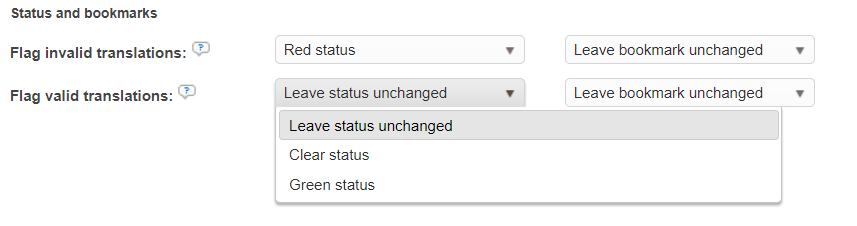
Changes in status or bookmarks to highlight QA issues
As a result, when QA issues are encountered you can optionally modify segment attributes like bookmarks and/or statuses, or leave them unchanged.
Learn More
-
Creating a Custom QA Profile: Create QA profiles with different sets of rules or configurations.
-
Quick QA Check: Detect and fix tag and spacing issues directly in the Translation Editor.
-
Spellcheck Dictionaries: Configure the dictionaries used by the Spell Check rule.