
DeepL is a machine translation service recognized for its high-quality translations. Leveraging advanced convolutional neural networks trained on extensive text corpora, DeepL offers contextually relevant translations and has been expanding its language offerings to several European and Asian languages.
Users of Wordbee Translator can connect to DeepL and its API features by creating an MT Profile to leverage DeepL's MT capabilities for documents and segment translation as well as a service tool on Wordbee MT Hive.
DeepL Profile Setup
1. Create Your DeepL Profile
Follow our configuration guide for MT Profiles and choose “DeepL” when you create it.
2. DeepL-specific Settings
The DeepL MT connector enhances translation capabilities through two distinctive features: glossaries and formality.
2.1 Formality
The formality feature enables users to choose between formal and informal tones, adapting the translation to suit the context and audience of the document. In particular, this feature determines the pronouns and related words used in your translation. The Automatic option will not favor any formality but try to use the context to find the translation with matching formality.
Please note that this feature is only available for some target languages. For more information, please refer to the DeepL documentation or contact DeepL directly.

2.2 Glossaries
Glossaries let you enforce specific terminology, so that every MT request sent through this profile translates your key terms consistently.
You can attach DeepL glossaries to your Wordbee MT profile. Click Refresh in the Glossaries section to load the glossaries available for your DeepL API key, then select the ones you want to use. You can select one glossary per language pair, because DeepL applies a single glossary to each translation request.
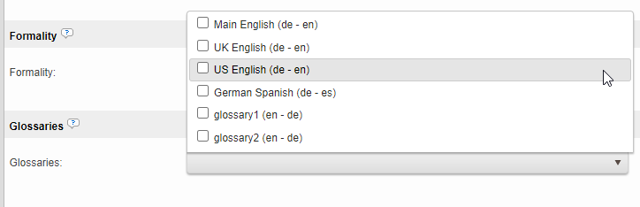
Which glossaries can be used
-
Glossaries created through the DeepL API.
-
Glossaries created in the DeepL web app or DeepL apps, provided they contain a single language pair in one direction (for example English → German).
Glossaries that contain several language pairs or both directions (DeepL "multilingual" glossaries, for example English ↔ German) are not listed in Wordbee at this time. To use the same terminology in both directions, create one single-direction glossary per language pair in DeepL.
Keeping glossaries up to date
If you replace a glossary in DeepL (for example, delete it and create a new version), open the Wordbee MT profile, click Refresh, select the new glossary and save. Do the same if you edit a glossary in the DeepL web app and it no longer appears in the list.
⚠️ If the profile still points to a glossary that no longer exists in DeepL, all MT requests for that language pair fail with the message "DeepL: Unfortunately, the selected glossary is unavailable."
Glossaries are not supported for all language pairs available in DeepL. For more information, please refer to the DeepL documentation or contact DeepL directly.
2.3 Style Rules
Style rules let you apply your organization's writing-style preferences to every translation, such as a formal tone, specific punctuation conventions, or the capitalization of product names. You define style rules in your DeepL account, and Wordbee applies them automatically to each MT request made through the profile.
To use style rules, open your DeepL MT profile and locate the Style Rules section next to the Glossaries section. Click Refresh Style Rules to load the rules available in your DeepL account, then select the rule to use for each target language and save the profile. From that point on, all translations to that language follow the selected rule. No extra steps are needed when translating.
The Style Rules section in the DeepL MT profile settings, showing the Refresh Style Rules link and a list of rules with one rule selected for a target language.
Style rules are defined per target language: each rule applies to one language, and you can select one rule per target language. Selecting two rules for the same target language shows a validation error when saving. Languages without a selected rule, and languages that DeepL does not support for style rules, are translated as usual without any rule applied.
Style rules require a DeepL Pro API subscription and are currently available for eight target languages: German, English, Spanish, French, Italian, Japanese, Korean, and Chinese. If your API key does not include style rules, the list shows a message that no style rules are available for the provided key.
If a selected style rule is later removed in DeepL, translation requests show a clear error message. In that case, refresh the list and update your selection in the MT profile.
Style rules work together with the other DeepL settings on this page: glossaries, formality, and context are all applied alongside the selected style rule. For more information about style rules, please refer to the DeepL documentation or contact DeepL directly.
2.4 Context
Leveraging DeepL's context parameter, users have the capability to include prompts to each MT request that boost the precision of translations. DeepL recommends this feature, especially when dealing with brief, low-context texts such as product names on e-commerce sites, article headlines, or UI elements.
In Wordbee, input the context prompt in the Context section to apply it with each use of this machine translation profile.

Alpha Feature
This feature is marked as an alpha feature in DeepL's documentation, highlighting the possibility of deprecation and varying machine translation (MT) results with new versions. For feedback, contact DeepL at api-feedback@deepl.com.
For more information about the context parameter and its application, please refer to the DeepL documentation or contact DeepL directly.
2.5 Next-Generation Models and Supported Languages
Wordbee always requests DeepL's next-generation models for every language pair. When the next-generation version is not yet available for a given pair, DeepL automatically falls back to the classic model on a per-request basis. This behavior is handled by DeepL and requires no configuration in Wordbee.
DeepL also supports many newly added languages, including regional variants such as Chinese (Simplified and Traditional), Portuguese (Brazil), and Spanish (Latin America). You can enable any of these from the language list of your existing DeepL profile.
For a small number of newer DeepL languages, inline tag preservation is not supported. Translations for those languages are sent to DeepL as plain text and come back without inline formatting. Glossary support is also limited for some of these language pairs. All previously supported language pairs continue to work unchanged. For the current list of language pairs that support inline tags and glossaries, refer to the DeepL documentation.
Learn more
How to configure DeepL's formality feature in MT Hive