
Once a link has been established, navigate to the Configuration tab in the Configure window. This tab allows you to configure the synchronization settings between your string localization tables in Unreal Engine and Wordbee.
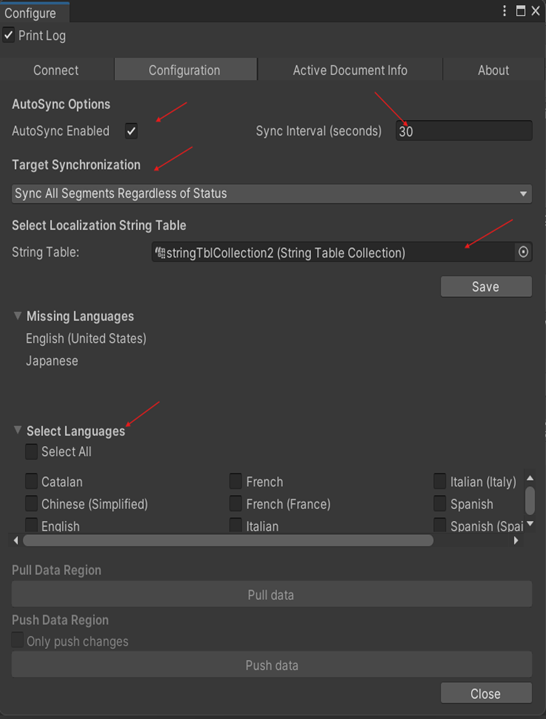
AutoSync Options
These options enable automatic synchronization between Unreal Engine and Wordbee, based on a user-defined time interval. Set the interval between 30 and 600 seconds, and the content will sync automatically after that period.
Target Synchronization
This option lets you choose which target language segments to sync from Wordbee Translator to Unreal Engine. The available options are listed below:
-
Skip Segment if Any Sub-Segment Has an Error Status – The target segment will be excluded if any of its sub-segments have an error (red status).
-
Skip Segment if All Sub-Segments Have an Error Status – The target segment will be excluded if all of its sub-segments are marked as erroneous (red status).
-
Sync Segment if All Sub-Segments Are Confirmed – Only target segments with all confirmed sub-segments (green status) will be included.
-
Sync All Segments Regardless of Status – All target segments will be included, regardless of their status.
Select Localization String Table
Choose the string localization table in Unreal Engine you want to sync with Wordbee Translator. The selected table is saved in a configuration asset for consistency in future sessions.
Missing Languages
This section identifies languages missing from the Wordbee Translator project. It also prompts you to check language settings and update the project configuration as needed.
Select Languages Section
This section shows the common languages between Unreal Engine and Wordbee, allowing you to specify which languages should be pushed or pulled during synchronization.
Data Synchronization Options
This section offers two methods for transferring data between Unreal Engine and Wordbee:
-
Pull Data Region: Imports localized strings from Wordbee Translator into your string localization tables in Unreal Engine.
-
Push Data Region: Sends localization data from Unreal Engine to Wordbee. If you select Only push changes, only the modified strings will be sent; otherwise, the entire dataset will be transferred.
The Configure window contains two more tabs.
The Active Document Info tab displays key details about the currently linked Wordbee document.
The About tab provides version and copyright information about Wordbee Link for Unreal Engine.