
How to Configure an AI Agent Service
To set up an AI-driven service, follow these steps:
-
Navigate to Suppliers: Go to the Suppliers page and select or create a company (Agency or Freelancer) acting as your AI provider.
-
Open Pricelists: Under the Prices tab, edit an existing service or click Add prices to create a new one.
-
Enable the AI Agent:
-
In the service popup, navigate to the AI Agent tab.
-
Enable this option and select the specific Agentic workflow from your repository
-
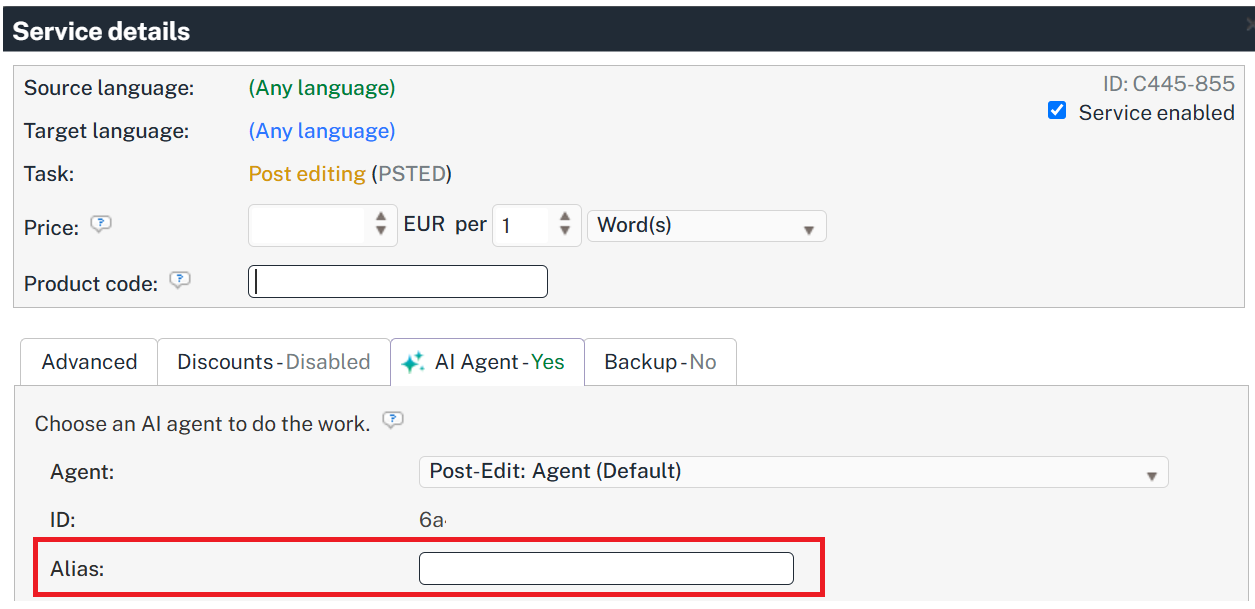
(Optional) Alias: Name this service so you can recognise it later, for example Legal. Free text, up to 60 characters.
-
(Optional) Prompts: Give the AI specific instructions for this service using the prompt input fields available.
-
-
Save: Click Add & Close.
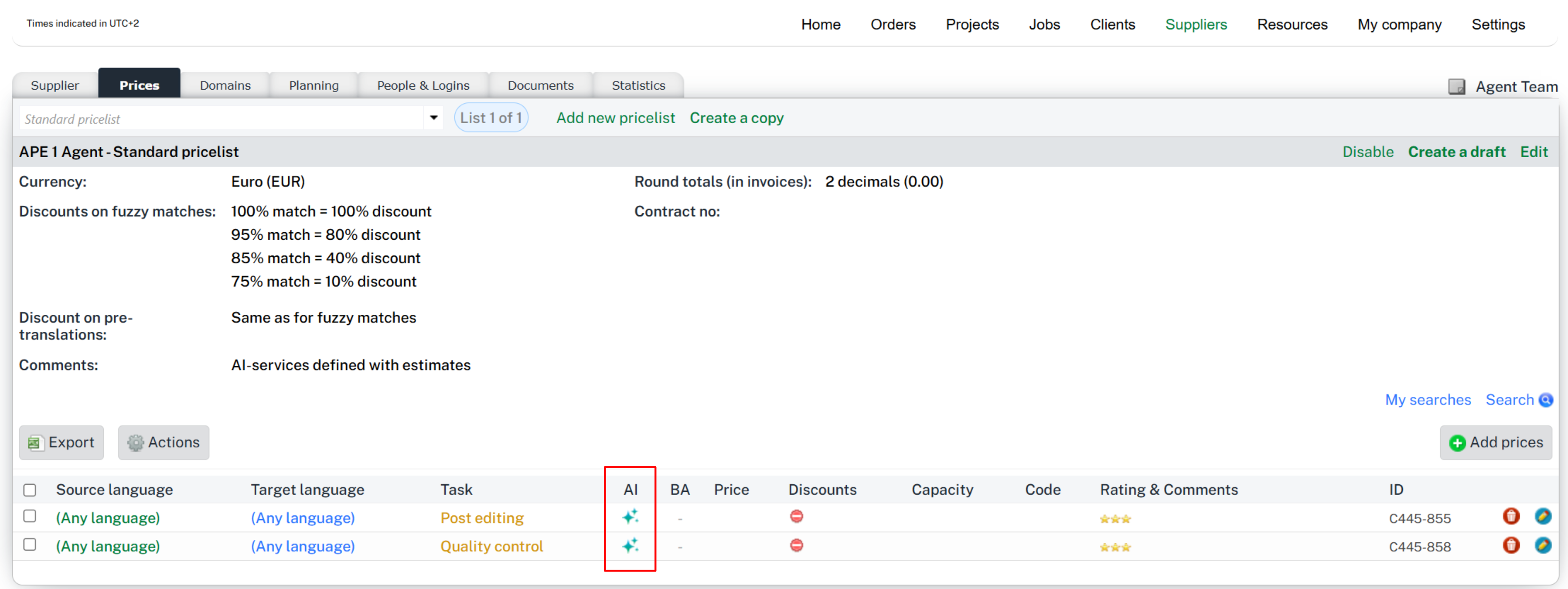
How to identify AI-driven services
A new ✨ AI-icon is added to the relevant pages where services are defined to indicate the ones that are AI-powered. Examples: The services section of the pricelist page. The supplier selector screen, etc.
To ensure system integrity, AI Agent settings in pricelists can only be edited by internal users with given permissions.
When a supplier offers several AI services for the same task (two Translation services that differ only by their instructions), give each one an Alias to tell them apart: for example Legal and Lifescience. The alias belongs to the service, so the same agent used on two services can carry a different alias on each.
Select the ✨ sparkle icon to open the AI agent info window, which shows an Alias line. It is the same window everywhere the icon appears: the pricelist, the supplier-selection popup, the job lists in Standard and Codyt projects, and the job details. Services with no alias show no alias line.
The AI Job Lifecycle in a nutshell
Once a service is mapped to an AI Agent, the manager can assign it to any job and automate the execution of the work as follows:
-
Handle the assignment: Assign the job to the supplier using the AI-enabled service.
-
Trigger the job execution: for AI agents, when the job status moves to In Progress, the call to the AI Agent is instantly triggered.
-
Work progress and results: The AI performs the work based on the linked flow and your custom prompts. Some flows will update the content of the segments while others will just annotate them. You can track the status of the AI execution via the "Sparkle" icon in job lists or in the Job details page (see image below).
Upon successful execution, the Agent updates the content and automatically moves the job to Completed status, sending an event to those who are monitoring the project and leading to other workflow steps that may come next.
Monitoring & Tracking
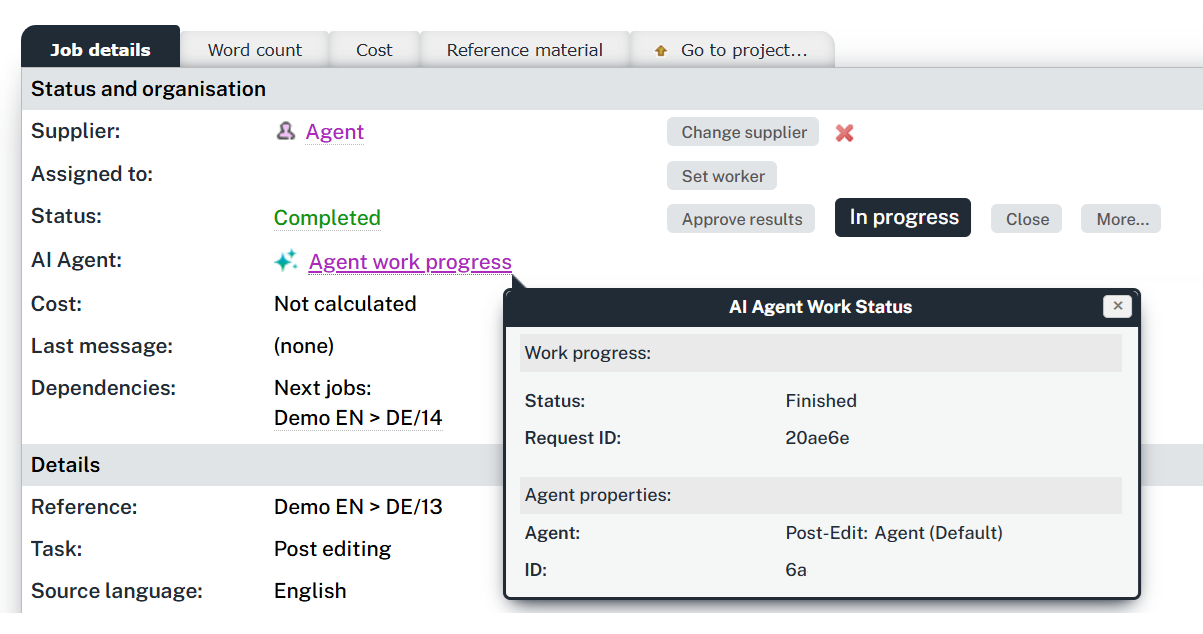
You can monitor AI activity across the platform:
-
Job Details: View specific AI request IDs and execution traces within the job details page.
-
Job Lists: Look for the AI Agent icon in both Standard and Codyt project job lists to quickly identify automated jobs.
-
Tooltips: In Codyt projects, hover over the status icons to see the current progress of the AI Agent.
Live work progress
While an AI agent is working on a job, the AI Agent Work Status popup shows how far it has got, for example Processing… 42%, and refreshes while you keep it open. It stops refreshing once the run reaches a final state, and a run that failed shows its error.
The percentage counts the run's work batches. It stays at 99% until the run itself reports completion, so a flow starting its last batch is never shown as finished: the status line is what tells you the work is done.
Document preparation shows the same kind of progress. While machine translation runs, the Prepare files popup reports the phase instead of sitting on Counting…, for example Machine translation (de)… 42%. The line names the target language and starts again for each one. Machine translation runs at mark-online in Codyt projects, and during the word count in Standard projects.
Progress appears only when the AI reports it. Where it is not available, for example with a machine translation connector that does not report progress, both popups show exactly what they show today.